
GFI EndPointSecurity 3
In the past couple of years, we definitely saw an up trend of portable devices usage. From handhelds, to music players, these devices offer a number of top notch options, one of them being an effective device for storing data. With all the good characteristics this way of backing up or transferring data offers, we can also identify a security threat that can be derived from this process.
This is something similar to the trend of organizations banning mobile phones from some portions of their facilities. Almost every new mobile phone has a quality built-in camera, so confidential data can be easily snatched and digitalized. With other portable devices there is a very similar problem – technology is evolving and every new device is smaller and more powerful. It has become very easy to bypass some default system barriers and easily move potentially insecure pieces of software from the device to a specific computer, or vice versa, taking home some protected company data. Security products such as GFI’s Endpoint Security help in this line of work and add an extra layer of security to your organization’s network environment.

List of controlled devices.
GFI EndpointSecurity is installed and managed from a central location. It is actually constructed out of two parts. The first one is GFI EndPointSecurity user console that offers the administrator means of configuring various policies and installing remote client software on to the network computers. The client software, regarded as GFI EndPointSecurity agent, is a client side service that is acting upon the protection policies from the main computer. Depending on the configuration it will either allow or deny the user access to the specific resource.
The software in question provides a list containing a number of portable device types and places them in the appropriate groups. Besides the general selection of media like floppies, CD and DVD ROM discs, GFI Endpoint has the following categories: Storage Devices (flash and memory cards, readers and set of multimedia players), PDA devices, Network adapters (Bluetooth, WLAN and infrared), Modems (mobile phones and smartphones), Digital cameras and a selection of other devices ranging from ZIP to tape drives.
GFI EndPointSecurity’s line of work is pretty straightforward. I will go into more details about all the parts of the whole process later, but the things go like this: You define a unique protection policy for a group of computers. During the configuration steps you specify the resources users of some groups or domains can or cannot access. With a click of a button, that policy is updated to the client agents and they are now ready to enforce it. For instance: if you denied access to digital cameras, as soon as the user tries to connect it to her computer, the software will deny the request and properly log all the possible information about the event.
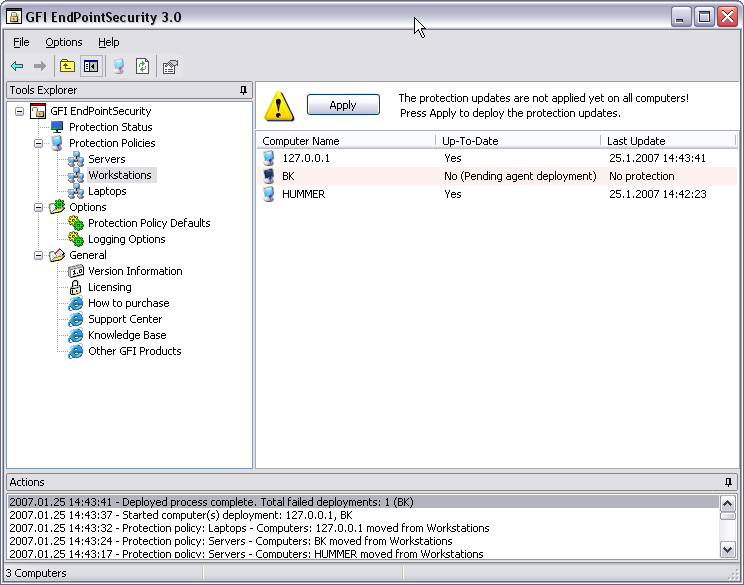
Listing of computers added to the Workgroups protection policy.
The whole process works upon a set of user groups that GFI EndPointSecurity installs by default (there is also an advanced option of setting custom groups) – GFI_ESEC_Device_ReadOnly and GFI_ESEC_Device_FullAccess. These groups hold information on how the users’ computers will react to configured devices. Bottom line, when the remote user plugs in a device, in our case a digital camera, the agent identifies if the device is being monitored and than checks the Active Directory or Local Users and Groups to verify if the user is a member of the privileged group. The actions are directly connected with groups.
Users can be added to the group via the product’s user console or Active Directory/Local Users management console. The structure of the user console is quite spartan so it is a piece of cake to customize specific devices for controlling purposes, as well as adding users to the precise groups.
The most important part of the configuration process is setting up the protection policies. By default, GFI EndPointSecurity offers three policies: Servers, Workgroups and Laptops. These are of course just samples and it is simple to rename them or create your own. I would recommend customizing this listing to the maximum, because when you start grouping your computers in these policies you will need to think about optimization. As every designated policy has its own set of rules, you need to plan on wether you will group users by computer types (i.e. notebooks and desktops), or it will be better to control them when they are described by departments (marketing, tech support etc).

Protection policy properties with default users.
Besides being a mechanism of control, GFI’s product offers some versatile logging possibilities. When an action is triggered, the agent logs to a local event log, as well as to the SQL Server if the administrator enabled this option. The SQL logs can be read and exported in a number of ways, and the event logs can be inspected with different tools, the easiest of course being the Event Viewer.
The logging is working just fine, even in the occasion when a client computer is a notebook and it periodically gets disconnected from the network. All the device access protection procedures will still be active and all the events will be saved into a buffer. As soon as the computer connects to its “mother” network, the event data will be collected and stored. This is a nice touch, as it makes the integrity of a centralized logging place intact.
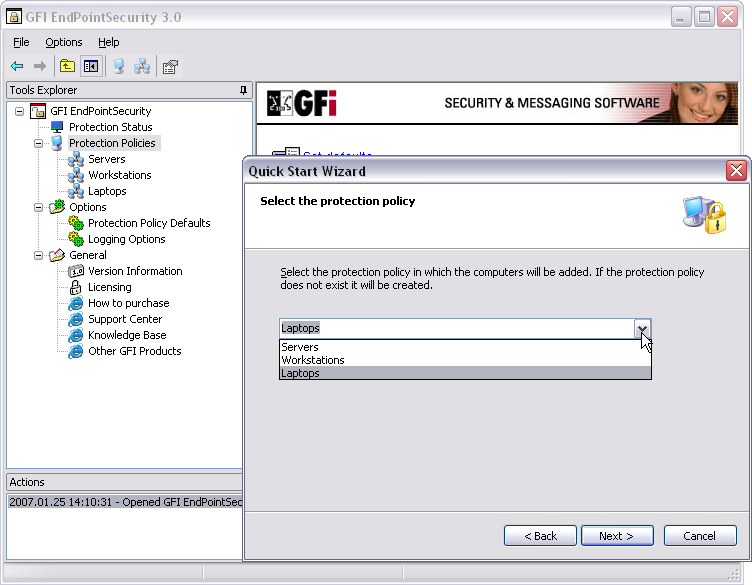
Default protection policies.
I’ll mention one more thing – in mid 2006, GFI released a ReportPack add-on, a full-fledged reporting companion to GFI EndPointSecurity. It allows administrators to generate graphical IT-level, technical and management reports based on the portable devices usage events recorded by GFI EndPointSecurity. It also enables administrators to pull together “Top 20” reports that cover the 20 users, machines, devices and applications which peaked connection activity. This addition is free for all registered users of GFI EndPointSecurity.
More than two years ago, GFI had seen a need for security solution that would take care of portable devices. Released under their LANguard product line, Portable Storage Control started with blocking unwanted USB connections. In the mean time, the software was totally re-done and rebranded as GFI EndPointSecurity.
I tested this software in a couple of scenarios (mainly networks with Microsoft Windows XP Professional SP1 and SP2 computers) and it worked like a charm. As you can see from this article, the software concept is pretty straight forward and every decent Windows administrator shouldn’t have any problems in deploying the solution.
Bottom line is that the software proved to be fast, stable and quite efficient. If you need to manage user access to the external devices from the computers in your network, you should definitely check GFI EndPointSecurity.