
Guide to Online Antivirus Solutions Part 2: Trend Micro HouseCall
Internet connections are getting faster every day, so online antivirus solutions transformed from proof of concepts into actual quality security services. Lately I have been playing with some leading online antivirus products and through the next couple of weeks I will be sharing my thoughts on them.
After Panda Software (now Panda Security) NanoScan and TotalScan, this week I am taking a look at Trend Micro’s HouseCall.
Trend Micro HouseCall is an application for checking whether your computer has been infected by viruses, spyware, or other malware. HouseCall performs additional security checks to identify and fix vulnerabilities to prevent reinfection.
HouseCall Version 6.5 – http://housecall.trendmicro.com
I tested this online virus scanner on two computers, Windows XP desktop and a new Windows Vista notebook. After starting the scanning process, first you will need to install the HouseCall kernel. This is a technology that makes it possible to scan your computer for malicious and display the results in your browser. Don’t worry about the additional installs, you will just need a mouse click or two.
For instance when you start the scan from a Mozilla Firefox browser you will have just one kernel option:

In a new Internet Explorer 7.0 browser running on Vista, besides this Java Kernel, you will be able to chose a “browser plugin”, that in my case proved to be a bit faster way of scanning.

As you will need to install a Java applet on your system, you will need to check out the publisher authenticity and agree to trust the signed applet pushed to you through the application.

Installing the applet and assigning the trust: yes mode on the applet is the same in both Firefox and Internet Explorer, but in the case of a fresh Windows Vista installation you will need to install Java runtime.

After you have everything installed from the client’s perspective, you will get an option of two different scans. The first one is rather interesting for scanning just the suspicious files.

While I checked a couple of files via the previous scanning option, I spent most of the time with the second way of scanning through complete computer scan.

On a rather “crowded” Windows XP computer the scan lasted more than 2 hours and on a new Vista installation (been using it for a couple of weeks now) the scan was done in approx. 35 minutes. Throughout the scanning procedure you are dynamically updated on the status via the grey bar on the left part of the interface. While this works well and you are even given a time countdown until the process finishes, on my Vista computer there was a situation when I thought the application froze. As you can see on the image below, the “Scanning for active grayware/spyware” procedure stuck on 80% and stayed like that for 15 minutes or so.

Out of the sudden, it moved on and presented the results.

As I am taking care of this computers, HouseCall didn’t find any real malware, but it was nice to see that it can check the status of installed Microsoft patches.
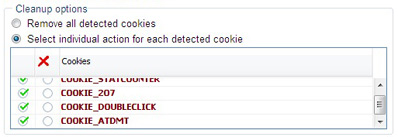
As usual, there is a list of active cookies which are considered a privacy risk. Not to me so I let them “live”, but I fixed a couple of Microsoft vulnerabilities I missed in the patching period.