
Online Secure Backups with the Allmydata Web 2.0 Application
Backups are an important part of anyone’s computer life. As a result of Murphy’s Laws, you will lose your precious data in the most inappropriate situation, so backing up should be one of your regular habits. The problem with burning CDs or DVDs is that often they get often misplaced, so using an online backup is good way to go. As I am following the rise (and fall) of Web 2.0 applications I came across a nice online solution called Allmydata.
Allmydata concept and pricing
Through a very simple user interface, the application gives you the ability of uploading unlimited amount of data to your online account. As you will see from the screenshots throughout this article, you can get up and running within a couple of minutes.
Allmydata has a price tag of $4.99 per month for one computer, with a 30 day free trial. From my experience this is relatively cost effective way of storing backups. During my work hours I regularly use the Amazon S3 service which is a bit cheaper (for the average user amount of data – up to let’s say 20-30 gigs of data), but the service needs to be used with third party applications or something your company would develop in-house. The other difference is that shared files through Allmydata don’t have any bandwidth limits, so you won’t be extra charged for the files you are sharing with your peers.
Security perspective
Files stored in the Allmydata protection mesh are protected in two ways: strong encryption is used with a unique encryption key for each file stored in the network and then each encrypted file is broken up into many small indistinguishable chunks before being sent out for storage. The only way to recover a file is to know which collection of file fragments, out of the millions of similar fragments, need to be collected to reconstruct the encrypted version of your file.
While extremely not likely, but even if an attacker knew which set of files they have to choose from, this would only give them access to the encrypted version of the file. Sounds pretty solid security construction to me.
Allmydata usage via web interface
Visiting Allmydata.com and entering your user credentials (big plus for the very fast 30 day trial sign-up process), you will enter the main working area of the application.
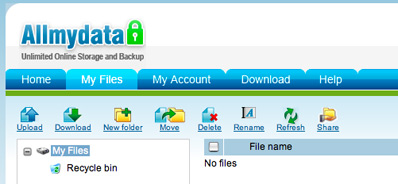
As you can see the user interface is very intuitive, so you can start uploading your stuff immediately. The default settings gives you the opportunity to upload up to 5 files, but you can add new “upload slots” with a click of a button.

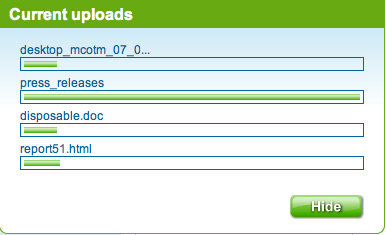
Allmydata shows a dynamic uploading status which both provides the live info and ensures that the files are indeed uploaded without any problems.
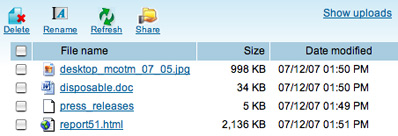
Files uploaded are shown in the main screen of the application. As Allmydata doesn’t support a bit advanced Web 2.0 features such as drag and drop, next to every file you will find a checkbox which can label it for further action.
Opening or saving a file:

Allmydata also provides functionality for sharing uploaded files. Every file can get its own unique https URL address.

That was the Allmydata usage through the web interface. Besides this way of uploading, Allmydata storage procedure can be done from your Windows computer via a custom application.
Allmydata usage via a Windows application
For the full backup experience, you should download the Allmydata native client which provides some good features including:
- Backup thousands of files simply with a drag and drop
- Automatic backup scheduling
- Restore multiple files and directories at once
- Backup your Outlook emails even while checking them

Trying the options provided from the menu started the browser and pointed it to a local server listening to port 8666. The software application was updated a couple of weeks ago, but I found the following piece of information in the Allmydata FAQ: “Allmydata works on Windows XP and Windows 2000 operating systems”. I hope the guys behind the project will update the application soon.
Overall, Allmydata as a web service is a pretty straightforward and useful application. While I would prefer drag and drop features in the web interface, while dealing with files it isn’t a problem of using good old check the box and click action routine.